The
product
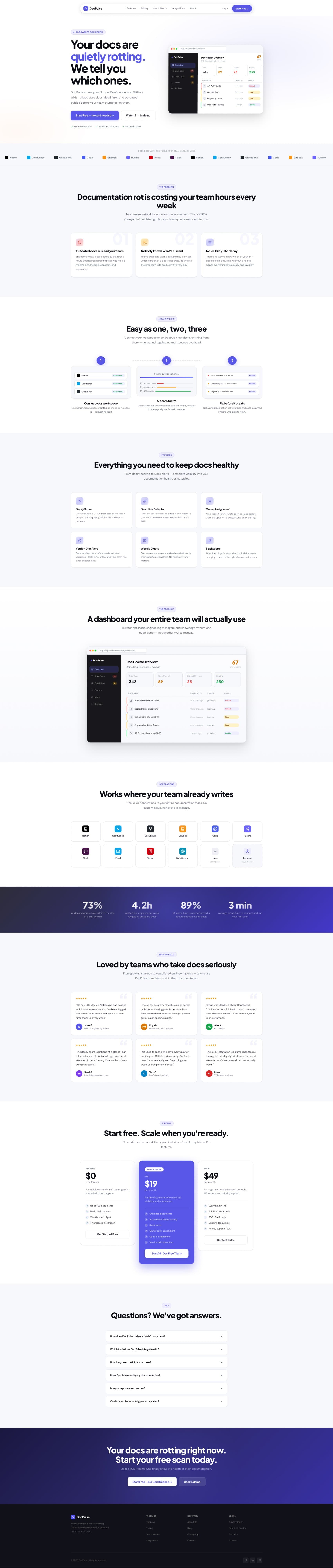
DocPulse is a design showcase built around a fictional but entirely believable SaaS product: an AI-powered documentation health monitor for engineering teams. It scans connected workspaces - Notion, Confluence, GitHub Wiki, and more - flags stale docs, dead links, and version drift, and assigns owners to fix them before the damage is done. The product is fictional. The problem it solves is real for almost every team that writes documentation. The showcase exists to demonstrate what a premium, B2B SaaS landing page looks and feels like when it's executed with full product thinking - not just visual polish.
What I was after
Sell the problem before the product - sequence every section to deepen conviction that this product understands documentation rot better than anything else the buyer has seen
Data as design material - use realistic doc names, age timestamps, decay scores, and broken link counts because specificity is credibility; placeholder copy destroys trust
B2B trust signals, earned not borrowed - testimonials, stat blocks, pricing tiers, FAQ, SOC 2 mentions, OAuth-only auth: every trust signal is one a real product would need to earn
Choices that shaped it
Tagline as a product statement
"Your docs are quietly rotting. We tell you which ones." Most SaaS taglines are forgettable. This one is specific, mildly alarming, and immediately communicates the product's core mechanic. Written the way a developer talks - direct, slightly blunt, no marketing softening. That register is intentional for the audience.
Hero dashboard mockup as the primary visual
Instead of an illustration or abstract gradient, the hero leads with a realistic app mockup - a workspace dashboard showing 342 docs scanned, 23 critical, 89 stale, an overall score of 67/100, and a sortable doc table with specific names and timestamps. It answers the user's first question - "what does this actually look like?" - before they've scrolled an inch.
Problem section before features
The landing page sequences: hero → integrations ticker → problem (three-point breakdown) → how it works → features → dashboard screenshot → integrations → social proof → pricing. Features don't appear until the user has been walked through the problem and the solution flow. This mirrors how a good sales conversation actually works - establish the pain, then present the fix.
Decay score as the product's hero metric
DocPulse could have led with any of its six features. It leads with the Decay Score - a 0–100 freshness rating per document. A single number is more actionable than a list of flags. It's also more defensible as a product differentiator - "we give every doc a score" is a clearer value proposition than "we detect stale docs."
Personalized weekly digest as a trust unlock
The digest feature - a weekly email per owner showing only their specific docs - solves a real organizational problem: accountability without surveillance. Designing this explicitly, with a realistic email mockup showing a named engineer's specific action items, communicates that DocPulse understands team dynamics, not just technical infrastructure.
Three-tier pricing with clear job-to-be-done per tier
Starter ($0, up to 100 docs, 1 integration), Pro ($19/mo, unlimited docs, 5 integrations, Slack, owner assignment), Team ($49/mo, API access, SSO, custom decay rules). Each tier is written for a specific buyer - individual contributor, growing team, enterprise org - with the job-to-be-done in the subtitle, not just the feature list.
About page as a credibility layer
Most portfolio-style showcases skip the About page. DocPulse includes one - with the builder's name, dual role framing, LinkedIn and GitHub links, and the full stack listed. For a solo-built product, the About page is the trust signal. It turns an anonymous SaaS landing into something with a person behind it.
What's inside
Hero with dashboard mockup, integration ticker, three-problem breakdown, four-step how-it-works flow, six-feature deep-dive with feature-specific UI mockups, stat block, testimonial carousel, pricing tiers, and FAQ accordion. Each section has a dedicated anchor in the navigation, making the page navigable as both a scroll experience and a direct-link reference.
Expanded treatment of each of the six features (Decay Score, Dead Link Detector, Owner Assignment, Version Drift Alert, Weekly Digest, Slack Alerts) with dedicated UI mockups per feature. Designed for users who arrive from search or referral already convinced of the category and evaluating the specifics.
Standalone pricing with the three-tier comparison table, annual/monthly toggle callout, and a focused FAQ covering the most common conversion-blockers - plan changes, annual discount, what counts as a document.
Four-step deep dive (Connect → Scan → Dashboard → Ongoing) with OAuth explanation, scan time benchmarks, and dashboard walkthrough. Designed to answer the "but how does it actually work?" question that stops technical buyers from signing up.
Full list of supported and coming-soon integrations with connection status indicators. Notion, Confluence, GitHub Wiki, GitBook, Coda, Nuclino live; Slack and email on paid plans; additional integrations listed with a "suggest one" option.
Solo builder profile, dual-role framing, tech stack breakdown, contact CTA. Login + sign-up pages with Google and GitHub OAuth options and email fallback. Clean centered layout, no distraction from the core action.
Built with care
The page is built as a multi-page SPA with hash-based client-side routing across seven distinct sections. Every page transition runs a smooth fade - no reloads, no flash. The integration ticker in the hero scrolls continuously via a pure CSS animation. The FAQ accordion opens and closes with a CSS max-height transition. The stat block counters animate on scroll using IntersectionObserver. All icons are inline SVG. The dashboard mockup is built entirely in HTML and CSS - no images, no canvas - which keeps it crisp at any screen resolution and makes it trivially responsive. Every major section is independently responsive down to 375px.
What I'd push further
DocPulse was the most product-thinking-heavy project in my portfolio. Building a convincing B2B SaaS showcase means more than making something look polished - it means understanding the buyer, the sales motion, the trust signals, and the information architecture of a page that has to convert a skeptical, technical audience. The constraint of building for a fictional product actually sharpened the thinking. There were no real features to fall back on, no real users to design for - every decision had to be justified by the logic of the product, not the convenience of what already existed. The dashboard mockup in the hero is static. The most compelling version of this page would include an interactive mock scan - a user enters a fake workspace name, watches a progress bar run, and sees a generated health report. That interaction would demonstrate the product's value in a way no amount of static copy can match.