The
product
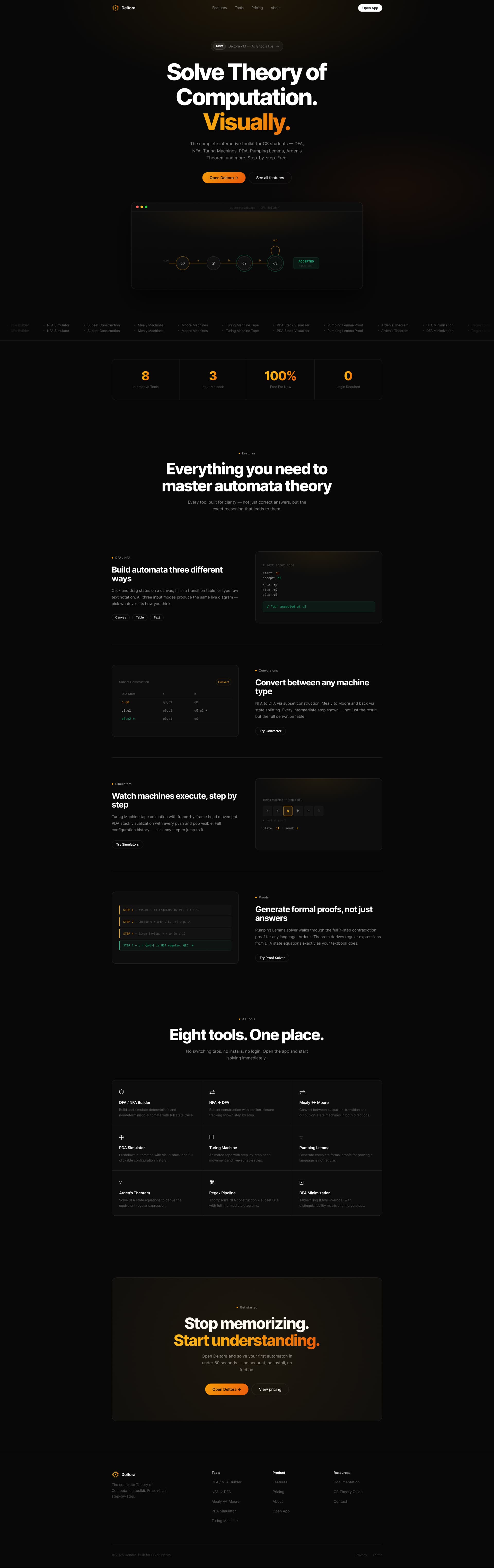
Deltora is a free, browser-based Theory of Computation toolkit built for CS students - and a real product I'm preparing to launch. It solves the one problem every automata student faces: nowhere online lets you visually build a DFA, simulate a Turing Machine step-by-step, or generate a formal Pumping Lemma proof - all in one place, with no login and no install. Deltora does all eight. This isn't a portfolio experiment. It's a product with a defined user base, a clear monetization model, and a real gap in the market it's built to close.
What it fixes
Theory of Computation is one of the hardest subjects in a CS curriculum - not because the concepts are impossible, but because learning them in isolation, with only a textbook and a pencil, makes them feel that way. The only widely known tool for automata visualization is JFLAP - a desktop application that's been around for decades. But JFLAP has a critical problem: it doesn't run reliably across all operating systems. Students on newer macOS versions, certain Linux distros, or ARM-based machines frequently can't get it working at all. It also requires a Java installation, demands a download, and has a UI that hasn't meaningfully changed in years. For a subject that's already intimidating, the tooling makes it worse. Deltora exists to close that gap - a tool that works on every OS, opens instantly in a browser, requires nothing to install, and doesn't just give answers but shows the full reasoning behind them.
Choices that shaped it
Zero friction as a design principle
The product's most important design decision isn't visual - it's that the app requires no login, no install, and no payment. That's a product constraint I enforced from day one. The UI follows from it: one click to open the app, tools immediately visible, no onboarding gate.
Dark academic aesthetic rejected
The obvious direction for a 'CS theory tool' would be dark and terminal-like. I went the opposite - clean white backgrounds, sharp navy typography, restrained blue accents. The goal was to feel like a tool a professor would trust, not a side-project someone hacked together overnight.
Three input modes for one tool
The DFA/NFA builder accepts canvas drag-and-drop, transition table input, or raw text notation. This wasn't scope creep - students think in different modalities. Some build visually, some think in tables. Locking them into one mode would break the tool for half the audience.
Step-by-step over final answers
Every tool surfaces the full reasoning chain - not just the result. The Pumping Lemma solver walks through all seven proof steps. The subset construction shows every epsilon-closure. A deliberate choice against the 'just give me the answer' pattern that most homework-helper tools use. Understanding the derivation is the point.
Pricing transparency
The pricing page is honest: all eight tools are free now, Pro adds cloud saves and exports when it launches. No fake urgency, no locked features behind a paywall on day one. Students are the audience - they notice when they're being squeezed.
What's inside
- →DFA / NFA Builder - canvas, table, and text input modes; full string trace
- →NFA → DFA Conversion with subset construction + epsilon-closure shown at every step
- →Mealy ↔ Moore Converter - bidirectional with full derivation table
- →PDA Simulator - visual stack with clickable configuration history
- →Turing Machine - animated tape, frame-by-frame head movement, live-editable rules
- →Pumping Lemma Proof Generator - complete seven-step formal proof
- →Arden's Theorem Solver - derives regular expressions from DFA state equations
- →Regex → NFA → DFA Pipeline - Thompson's construction + subset DFA
- →DFA Minimization - table-filling (Myhill-Nerode) with distinguishability matrix
- ◇Pro tier - cloud saves, PNG/SVG export, shareable links
- ◇Mobile-first input model - drag-and-drop replaced with structured form on small screens
- ◇Public gallery - shared community-built automata
Where it goes next
Initial launch targets CS students at my college - a direct, high-density user base studying the exact subject Deltora covers. Word-of-mouth within the CS department is the first distribution channel. From there, the target expands to GATE 2027 aspirants - a large, well-defined audience actively searching for study tools with no strong incumbent in the automata category. JFLAP is the only real incumbent, and it's vulnerable - OS compatibility issues, dated UX, zero browser support. No browser-native tool covers the full automata curriculum. Deltora is the first. A Pro tier covering cloud saves, diagram exports (PNG, SVG), and shareable links is the natural paid layer - features that students doing coursework and GATE prep will pay for once they're invested in the tool. The core eight tools stay free permanently; the free tier is what builds the user base that makes Pro viable.
What it taught me
Deltora started as frustration with a broken tool and a missing category. It's now a product with a live prototype, a defined market, and a launch plan. The design and engineering work is done. What remains is getting it in front of the people it was built for - and watching whether the assumptions hold up under real use.